Change of Name on LESCO Bill

Have you recently sold your property and need to transfer ownership of the electricity meter to the new owner or have bought a new house and wished to receive future electricity bills on your name? Maybe the name on your LESCO bill is misspelled/incorrect and curious to get it fixed to avoid any of the issues with service interruption or something else. 

Well, you can apply for Change Of Name on LESCO Bill with ease! Simply visit the ENC website > click “Change” button > select “Change of Name” > enter required details > attach documents > click “Submit” button. Additionally, If you want to change the name on your electricity bill and want a step-by-step guide along with screenshots, read the entire article.

Required Documents

Documents that are required to apply for name change on electricity bill are given below:

  • Attested CNIC (Computerized National Identity Card) Copy of Applicant
  • Applicant LESCO electricity bill Copy
  • Ownership Proof

Procedure to Apply for Change of Name on LESCO Bill using Website

Following is the procedure that may help you apply for change of name on LESCO Bill using website:

Visit ENC website

You can visit the ENC website at https://www.enc.com.pk/. Then, click the “Change” button on the left side of the ENC website homepage for changing name on LESCO Bill.

Click Change option image

Select Application Type

You’ll be provided with 3 options including Change of Name, Change of Tariff, Change of Load. Tick “Change of Name” box as you’re changing name on your electricity bill.

Tick Change of name box image

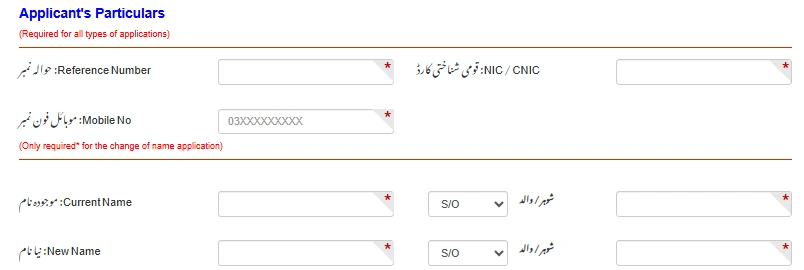
Applicant’s Particulars

In the “Reference Number” input-field, enter 14-digit Reference No. In the “NIC / CNIC” input-field, enter the NIC or CNIC of the applicant. In the “Mobile No” input-field, enter the mobile number of the applicant. 

Now, simply scroll down to section where (Only required* for the change of name application) is written. Then, In the “Current Name” input-field, enter the name of the person that is currently present on the LESCO electricity bill. Select “S/O, D/O, W/O, C/O” accordingly and enter the name in its input-field. 

Similarly, In “New Name” input-field enter the name of whose you want to transfer the connection. Select “S/O, D/O, W/O, C/O” accordingly and enter the name.  

Enter Applicants Particulars image

Attachments

In the “Attachment” section, attach all of the required documents. All required documents should be less than 300 KB. 

Attachment image

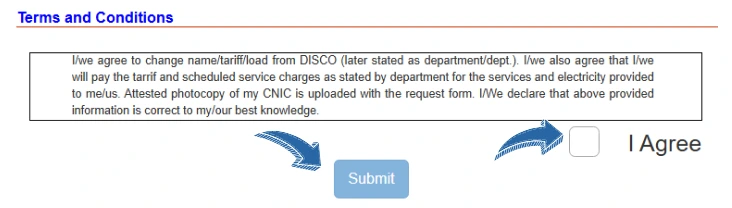
Terms and Conditions

After entering all of the required details and attaching documents. Read terms and conditions carefully and tick the “I Agree” box. Click the “Submit” button to submit your application. You’ll be provided with a “Tracking-ID” after successfully submitting an application. Note down “Tracking ID” to track your application.

Terms and conditions and submit button image

Note: You’ve to compile all of the required documents that you’ve submitted online in a file. Then, you’ve to submit that compiled file to the office. Your online application will not proceed until you submit this. 

How to Track LESCO Change of Name Application

To track LESCO name change application, follow procedure described below:

  • Click the “Track” option on the ENC Website homepage.
  • Select “Application Type” to “change of name/tariff/load”.
  • Select Company as “LESCO”.
  • Enter “Tracking-ID” in the input-field and click the “Submit” button.

The page through which you can check “Status of the Application” will be opened. As you’ll apply for the name change application, you’ll be issued with challan within 1 or 2 months. You’ve to submit that challan to any of the banks and then ownership will be changed on the electricity bill. 

Procedure to Apply for Change of Name on LESCO electricity bill by visiting Office

If you don’t prefer the online method, you can also apply for the Change of Name on the LESCO electricity bill by visiting any of the nearest offices. Follow steps that are given below to know how to do that: 

  • Visit the LESCO Office that is near to you.
  • Ask them to provide you with a change of name application form.
  • Enter all of the required details on the application form. 
  • Attach all of the documents that are required with the application form. 
  • After submitting the application form you’ve to pay the processing fee. 
  • Then, you’ll get confirmation about your application via your mobile number that you’ve provided to them.

That’s the procedure through which you can change the name on the electricity bill by visiting the office. 

Benefits of Changing Name on LESCO Connection Online

  • You can fill the name change application form without leaving your home. 
  • You can quickly submit your name change application. 
  • You can track status of the application with ease.

You can change the ownership of your LESCO meter by visiting ENC Website > Selecting Change option > clicking “Change of Name” box > Entering applicant particulars > attaching required documents, reading terms and conditions and clicking the “Submit” button.

You can change the electricity meter bill name by visiting enc.com.pk website and entering all the required details under the “Change” option. If you want to change LESCO electricity meter bill name, follow the procedure in this article. 

You can change your name in your electricity bill in Pakistan using the ENC Website. If you want to change your name in your LESCO electricity bill in Pakistan, follow the detailed procedure described in this article.

The process of change of name includes visiting ENC website > selecting change option > entering all of the required details. 

Yes, you can apply for change of name on LESCO electricity bill using ENC Website.

We’ve described the procedure that may help you apply for a change of name on LESCO Bill. You can apply for a change of name on LESCO Bill by following the procedure described in this article with ease. If you’ve any queries about changing name on the LESCO electricity bill, don’t hesitate to contact us.

Leave a Reply

Your email address will not be published. Required fields are marked *