
LESCO New Connection
People usually apply for a new electricity connection when their existing one becomes faulty or damaged or when they purchase a new home. Have you recently bought a new house and wish to apply for an electricity connection but are unsure about the application process?
There is no need to worry. The process for applying for a LESCO new connection is quite simple and we are here to provide you with all the necessary details. In this article, we will explain in detail the required documents, the different types of connections available, application process, and other important information related to it. Simply read this article in full to easily understand the process of applying for a new LESCO electricity connection.
Documents Required for a New Electricity Connection
You will need the following documents when applying for a new electricity connection:
Note: The size of each file to be uploaded must be less than 300 KB.
LESCO meter connection types
In LESCO, meter connections are divided into different categories on the basis of load and connection type. Its information is given below:
Type of load
Connection Types
How to Apply for LESCO New Connection
The procedure of applying for a new LESCO electricity connection is given below:
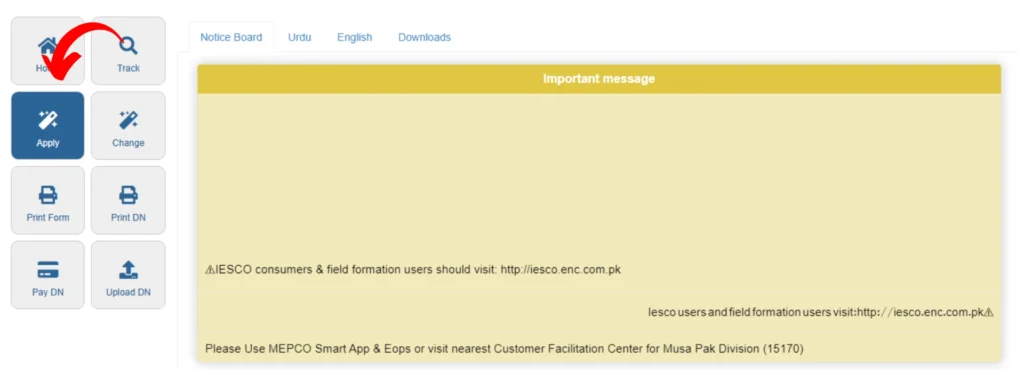
First of all, visit the ENC website by clicking button above. Then click on the “Apply” option located at the top left.
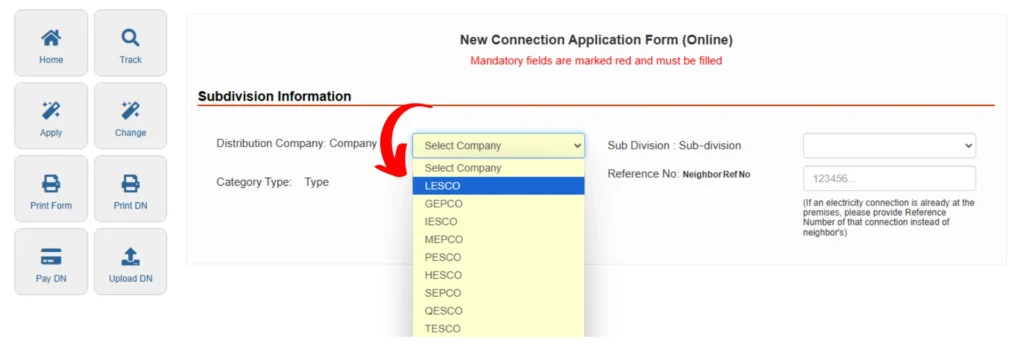
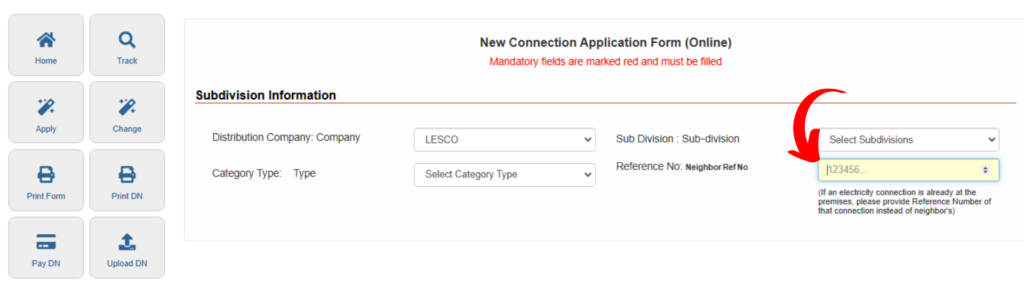
Sub-Division Information
Step 1: Select LESCO as your electricity distribution company in the “Distribution Company” box.
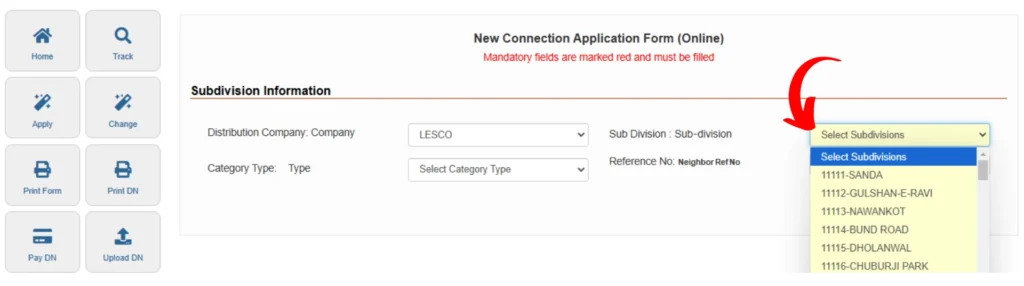
Step 2: Select your relevant sub-division in the “Sub-Division” box.
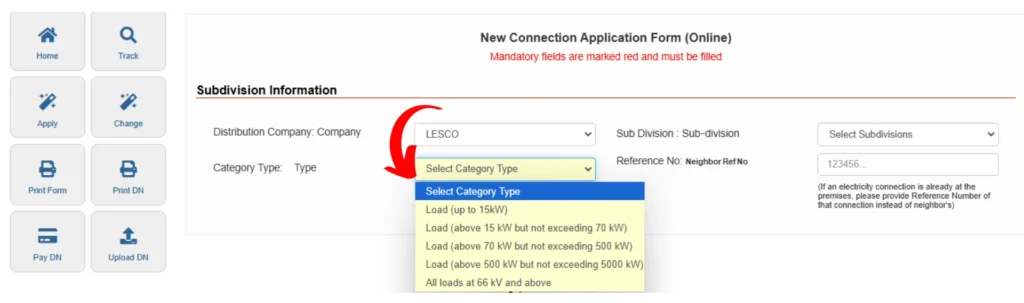
Step 3: Select your connection category in the “Category Type” box.
Step 4: Enter the electricity connection Reference Number of your nearest neighbor in the “Neighbour Ref No” section.
Note: If there is already an existing electricity connection at the property, enter the Reference Number for that connection.
Step 5: In the next section, select the appropriate connection type based on your requirements.

Applicant’s Particulars
Step 1: If you are a home owner, select Landlord/Owner option in “Applicant Status”. If you live in a rented house, choose the Tenant (Rental) option.
Step 2: Enter your full name in the “Applicant Name” box. Enter your father/husband’s name in the box provided.
Step 3: In the “Citizenship” section, if you are a citizen of Pakistan, select the Pakistani option. If you are not a citizen of Pakistan, choose the Foreigner option.
Step 4: Enter your NIC/CNIC number in the “NIC/CNIC” box. After this enter your current residential address in the field “Present Address”.
Step 5: Enter your mobile number in the box “Mobile Number 1”. Enter your father’s or husband’s mobile number in the second mobile number box.
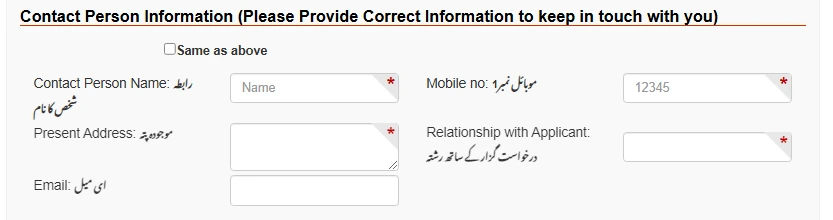
Contact Person Information
Enter the required information of the Contact Person to stay in touch. If the Contact Person Name, Mobile Number 1, Current Address, Relationship with Applicant and Email are same as above information then tick the “Same as above” option. This will avoid the need to enter the same information again.
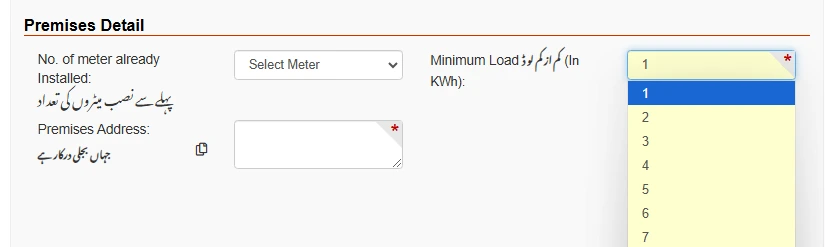
Premises Detail
Step 1: If you already have an electricity connection, enter the number of existing electricity meters in the “No. of Meters Already Installed” box.

Step 2: Select the minimum load according to your requirements from the “Minimum Load” option.
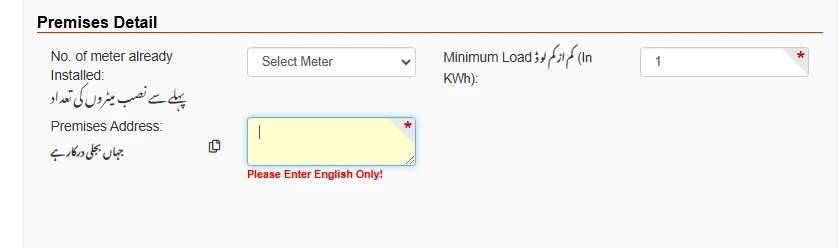
Step 3: Enter the address where the new electricity connection and meter are to be installed in the “Premises Address” section.
Attachments
Upload photographs of the following documents in the Attachments section:
Terms and Conditions
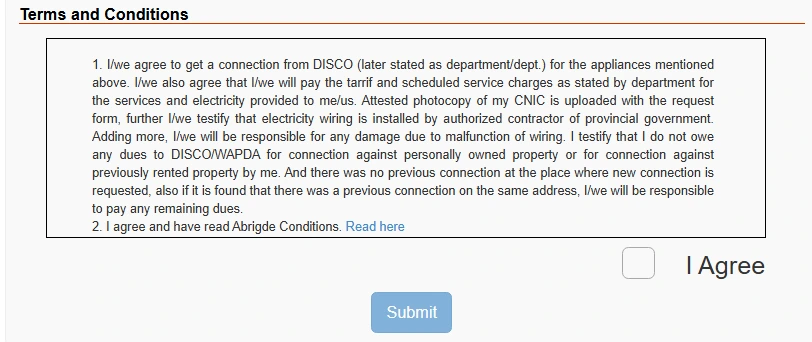
Read the “Terms and Conditions” carefully and then click the “I Agree” button. Then, enter the provided captcha code correctly. After verifying all the information, click the “Submit” button to submit your application.
Demand Notice and Installation
Demand Notice ( DN )
After successfully applying for a new electricity connection, a Demand Notice needs to be submitted to proceed with your installation request. You can get this demand notice from your nearest LESCO office. For the complete process of application tracking of new connection and printing of demand notice, you can see the detailed guide “LESCO Demand Notice“.
Meter installation
After acceptance of the paid demand notice, the meter for the new electricity connection will be installed by LESCO at the given address.
Estimated time for new electricity connection
The estimated time for a new electricity connection is provided below:
| Category | Required Time (Days) |
| Up to 400 V and Load Up to 15kW | 30 |
| 400V and Load up to 70kW | 53 |
| 400V and Load up to 500kW | 73 |
| 11/33 KV and Load up to 5000kW | 106 |
| Up to 66 KV and Load above for all loads | 496 |
We have explained simple process of applying for a LESCO new connection. If you still have any questions regarding the LESCO new connection, feel free to ask in the comments.