
How to Pay LESCO Bill Through HBL App – Step by Step Guide
Have you ever had trouble finding the LESCO bill payment option in the HBL Mobile Banking App? You may have tried to make a payment by going to the “Electricity Bill Payment” section but then became confused about what to enter in the “Consumer No” field. Should you enter the same 14-digit Reference Number or the 7-digit Customer ID that you use to check LESCO bill online or something else?
No need to worry as a simple procedure to pay LESCO bill through HBL App is provided here. Simply open the HBL App → Bill Payment → Electricity Bill Payment → LESCO → Enter your 14-digit Reference Number in the “Consumer No” field → Next → Verify your bill details → Enter the OTP → Click “Pay”. If you want to understand the complete and detailed process of paying your LESCO electricity bill through the HBL Mobile App in an easy way then read this complete article.
Procedure to Pay LESCO Bill Through HBL App
The detailed process of paying your LESCO electricity bill through the HBL App with the help of screenshots is explained below.
Step 1: Open the HBL Mobile App
Open the HBL Mobile App on your Android or iOS device and log in to your account.
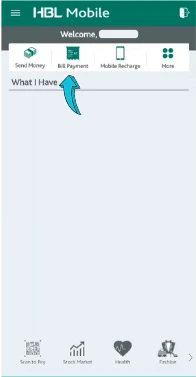
Step 2: Select Bill Payment
After logging in, click on the “Bill Payment” option available in the HBL Mobile App.
Step 3: Select Electricity Bill Payment
From the available bill payment options, select “Electricity Bill Payment” to pay your LESCO electricity bill.

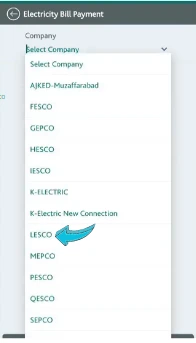
Step 4: Select LESCO
A list of electricity companies will appear on the screen. Select LESCO from the list.
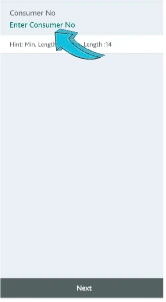
Step 5: Enter Your LESCO Reference Number
After selecting LESCO, enter your 14-digit LESCO Reference Number in the input field labeled “Enter Consumer No”. Then click the “Next” button. Make sure that you enter the Reference Number correctly to avoid an error.
Step 6: Verify Your Bill Details
After entering the Reference Number and clicking “Next” your bill related information will appear on screen. Carefully check information including the customer details and bill amount to make sure that the bill belongs to you. After confirming the information click the “Next” button again.
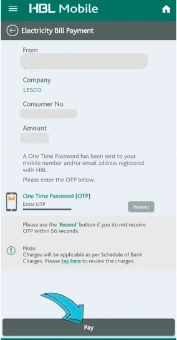
Step 7: Enter OTP and Pay the Bill
After clicking “Next” an OTP will be sent to your registered mobile number. Enter OTP in the provided field and click the “Pay” button. After successful verification your LESCO electricity bill payment will be completed through the HBL Mobile App. Keep receipt for your records.
In this article detailed process of paying a LESCO electricity bill through the HBL Mobile App has been explained. By following the step by step instructions given above you can easily pay your LESCO bill through the HBL App. If you have any problem or question while paying your LESCO electricity bill through the HBL Mobile App feel free to ask in the comments below.